
Our Blog
Restaurant Payment Trends That Affect Your Margin
September 7th, 2026
A guest is ready to leave, the dining room is turning over, and the check takes longer than it should. That small delay can affect tips, table turns, staff stress, and the guest’s final impression. Restaurant payment trends are worth watching because the best changes solve those everyday problems. The wrong changes simply add another monthly fee, another device to manage, and another system for staff to learn.
For restaurant owners, the question is not whether to accept every new payment method. It is whether your payment setup helps the operation run faster while keeping processing costs in line. Here are the trends that matter most and how to evaluate them without getting pulled into unnecessary complexity.
Restaurant Payment Trends Shaping the Front of House
Pay-at-the-table is becoming a service expectation
Guests increasingly expect to pay at the table, whether through a handheld card terminal, a QR-based check experience, or a server-presented device. For full-service restaurants, handheld payments are often the most practical option. The server can close the check, collect a tip, and return the device without walking back and forth to a fixed terminal.
The operational payoff is real when the system works well. Checks close sooner, tables are available sooner, and servers spend more time with guests instead of standing at a payment station. Handheld devices also reduce the chances of a card being misplaced during a busy shift.
Still, pay-at-the-table is not automatically right for every operation. A fast-casual restaurant with counter ordering may get more value from a better customer-facing terminal than a fleet of handhelds. A high-volume bar may need devices built to handle rapid tabs and frequent card captures. The device, POS integration, Wi-Fi coverage, and staff workflow all matter more than the trend itself.
Contactless payments are standard, not a specialty feature
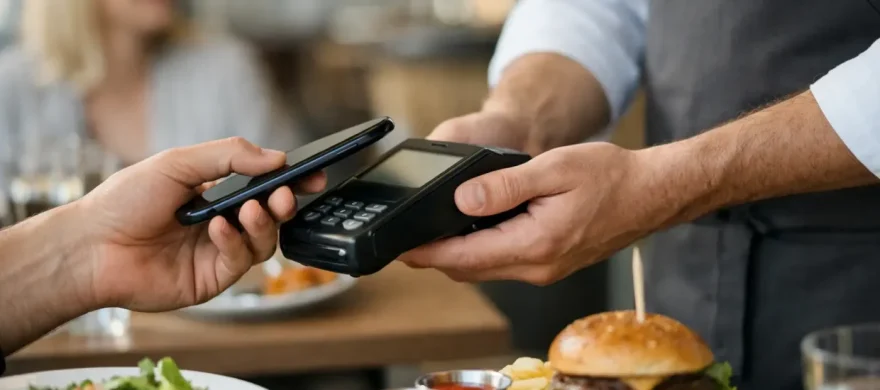
Tap-to-pay cards, mobile wallets, and wearable devices are now part of normal guest behavior. A customer who can tap their phone and leave in seconds is less likely to view the experience as a novelty. They simply expect it to work.
For operators, contactless acceptance can reduce checkout friction, especially at coffee shops, breweries, quick-service counters, and lunch-focused concepts. It also gives guests another way to pay when they do not want to pull out a physical card. The key is making sure every guest-facing payment point accepts contactless payments reliably. One terminal that cannot tap while another can creates avoidable confusion during a rush.
This is also a good time to review aging equipment. Older terminals may process chip cards but create slow lines, inconsistent approvals, or awkward tip prompts. Replacing equipment should be tied to a clear improvement in speed, functionality, or support, not just a promise of newer hardware.
Digital receipts and text-based options reduce friction
Paper receipts are not disappearing overnight, particularly in full-service dining and bar environments where signed checks may still be part of the workflow. But more guests now prefer an emailed or texted receipt, especially for business expenses and takeout orders.
Digital receipts can reduce paper use and make it easier for guests to keep records. More importantly, they can simplify the closeout process when paired with a POS system that clearly tracks payments, tips, refunds, and order history. Restaurants should be careful about how customer contact information is collected and stored. A receipt option should feel useful, not like a marketing requirement at checkout.
Online ordering payments need tighter control
Online ordering remains a major revenue channel for many restaurants, but payment processing behind the scenes is often more complicated than owners realize. Orders can come through a restaurant website, a branded app, third-party delivery marketplaces, catering forms, and phone orders entered manually by staff. Each path may carry different fees, settlement timing, chargeback risk, and reporting challenges.
The trend to watch is not simply more online payments. It is better visibility into how those payments move through the business. If staff has to reconcile multiple dashboards at the end of the night, mistakes become more likely. If online orders do not flow cleanly into the POS, the kitchen can fall behind and the guest experience suffers.
A better setup centralizes reporting where possible and makes order sources clear. Owners should know which sales came from in-house transactions, direct online ordering, and third-party channels. That information helps separate profitable digital sales from sales that look strong but lose too much margin to commissions and processing costs.
The Real Issue Behind Restaurant Payment Trends: Cost Control
New payment features can make a restaurant look modern, but the monthly merchant statement is where the decision has to make sense. Restaurants already face tight margins, rising food costs, labor pressure, and unpredictable demand. Payment processing should not be a blind expense.
Interchange rates, card brand fees, processor markups, gateway charges, monthly minimums, PCI-related fees, equipment costs, and statement line items can all affect the total cost of accepting cards. The problem is that many statements are difficult to read, and an owner may not know whether an increase is caused by card mix, pricing structure, new fees, or a billing error.
Before changing providers or adding payment technology, review the full cost picture. Ask what the new equipment costs, whether there is a contract term, how support is handled, and whether the system requires separate gateways or add-on software. A low advertised rate does not tell the whole story if it comes with higher monthly charges or poor service when a terminal stops working on a Friday night.
For some restaurants, cash discounting or surcharge programs may be part of the conversation. These programs can offset processing costs, but they need to be set up carefully and communicated clearly. Local regulations, card network rules, guest expectations, and the restaurant’s price point all matter. A neighborhood café and an upscale dining room may get very different reactions from guests.
What a Restaurant POS Should Do Now
The restaurant POS is no longer just a register. It is the operating center for orders, payments, menus, reporting, staff access, tips, and often loyalty or gift cards. That does not mean a restaurant needs every feature available. It means the system should handle the work the restaurant actually does without forcing staff into workarounds.
For a bar, that may mean easy tab management, quick reauthorization options, reliable tip adjustment, and strong shift reporting. For a full-service restaurant, it may mean table maps, seat-level ordering, course timing, split checks, and handheld payment support. For counter service, speed of ordering, clear modifiers, kitchen routing, and customer-facing payments may be the priority.
Training deserves as much attention as the software. A POS that looks impressive in a sales demo can slow down a team if the screen flow is confusing or if staff cannot resolve common payment issues quickly. Installation, menu setup, device placement, and hands-on staff training are not extras. They are part of whether the investment produces a return.
Security Has to Work Without Slowing Service
EMV chip cards and contactless payments have improved transaction security, but restaurants remain exposed to fraud, disputed charges, and account takeovers involving online orders. A single chargeback may not be devastating. A pattern of chargebacks, unclear ticket documentation, or weak refund controls can become expensive quickly.
Restaurants can reduce risk by using EMV-capable equipment, limiting employee access based on job role, requiring manager approval for sensitive actions, and keeping clear order and payment records. For online orders, address verification and card security features may help, but settings should be tested carefully. Overly strict fraud filters can block legitimate customers and create more abandoned orders.
The practical goal is balance. Security should protect the business without making a regular guest jump through extra steps every time they order dinner.
A Practical Way to Evaluate Your Payment Setup
Start with a walkthrough of a normal busy shift. Watch where payment delays happen. Is the bottleneck at the counter, the table, the bar, the kitchen, or during end-of-day reconciliation? Then compare that workflow with your processing statement and POS reports.
Look for specific problems: slow terminals, missing contactless acceptance, confusing tip prompts, excessive manual entry, disconnected online orders, inconsistent deposits, or fees that no one can explain. Those issues are more useful than a generic goal to “upgrade payments.” They tell you what needs to change and what should stay the same.
A local, hospitality-focused payment advisor can help separate real operational improvements from expensive distractions. Rocky Mountain Credit Card Processing works with Denver-area restaurants to review processing costs, recommend POS options that fit the operation, and support installation and training so the change does not create a new headache for the team.
The best payment setup is usually the one guests barely notice and staff can rely on during the busiest hour of the week. If payments are slow, fees are climbing, or your POS feels harder to use than it should, start with the workflow and the statement. The right next step will become much clearer.